
Distribute by centralizing it all
See a demos page for some demonstrations of the system.
The world changes fast: today, most users typically have access to several computers at work, at home and while in transit, all of them interconnected through Internet. This world is far from perfection: users face decentralized, uncoordinated, heterogeneous, and highly dynamic, practically uncontrolled environments. It is hard to develop and deploy applications for such a world. And once done, it is difficult to use them smoothly, unless one sits in front of the computer where they were deployed. We argue that one way to solve this problem is to first apply centralization as a design principle, and then recognize the existence of other computers running their native OS’s, importing their devices and controlling them from a central computer. Doing so it would be possible both, to easily build systems that can leverage on all the devices available to a given user, independently of its location, and to easily use those systems.
Octopus is a system designed to provide ubiquitous access to computing resources. Its approach is unique in that the central idea to distribute the system is to centralize everything on a personal computer. Devices and other services are later connected to this central system to provide distributed computing.
The system derives from Plan B, therefore it is heavily influenced by Plan 9, and shares most of the source code with both systems. The software is available.
This position statement describes the original idea that started this project. For a description of the system, you may read some of the papers listed in the papers page.
A tutorial is available.
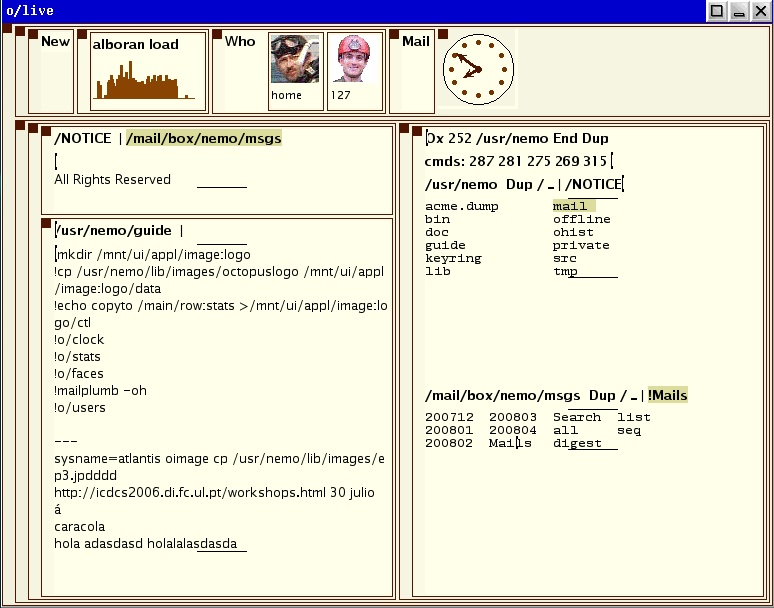
Here is a screenshot of the system
Software
Much of the software listed here is also available from Plan 9’s sources file server (see /contrib/nemo).
Octopus is under the same License used by Inferno, as indicated in our NOTICE.Octopus file. See the various license files in the Inferno system used to install the Octopus. This affects both manual pages and source code. It shouldn’t be a problem, because you need Inferno to run the Octopus. By downloading any of our distributions you are accepting that license.
This list describes parts of the system useful on their own and provides access to the entire distribution. Refer to the INSTALL.Octopus file to see how to install the software.
- The user’s manual for the development version of the Octopus. Also available in pdf.
- The bundled distribution of the octopus, including everything needed. This bundle includes Inferno, binaries and source for the Octopus, O/mero, O/live, Ofs, Oxport, and everything else but for the Plan 9 software shown below.
- A distribution of the Octopus software, without Inferno. Useful to upgrade your distribution. Includes just the octopus files (contents of /dis/o and /usr/octopus), in case you want just pre-compiled binaries for a terminal or just the source for the octopus.
- Plan 9 software for use when the Octopus PC is a Plan 9 machine. For example, programs using O/mero but executing on Plan 9, and mouse and keyboard redirectors for Plan 9.
- O/live and O/mero. The octopus window system for Inferno. This README shows how to install and how to run it.
- Ofs and Oxport. Two programs to connect Inferno systems across high latency links. This README shows how to install them.
- An Op file server capable of exporting resources from Nokia N95 devices.
 Fran. J. Ballesteros